
Download Order Manager – Android, Free, Order Management, Snoonu Technologies
Overview
Order Manager is a free Android application developed by Snoonu Technologies, designed to streamline the process of managing orders for Snoonu Partners. The app aims to simplify what is often a complex and time-consuming task by applying modern usability principles to the order lifecycle. By centralizing order tracking and status updates, it enables partners to stay informed and responsive, reducing delays and improving operational efficiency. The primary purpose of the software is to enhance communication between Snoonu and its partners through real-time visibility into order status.
Target users include business partners, distributors, and service coordinators who rely on timely order updates to manage inventory, fulfillments, and customer commitments. The application supports a workflow where users can monitor order progress from initiation to completion, with built-in notifications ensuring they are alerted to critical changes. This makes it particularly useful for professionals in logistics, retail, and service-based industries who depend on accurate and timely data.
While specific details about the developer’s background are limited, Snoonu Technologies appears to focus on creating tools that improve partner engagement and operational transparency. The app is accessible via the Google Play Store, indicating a mobile-first strategy for distribution. Real-world use cases include tracking bulk orders, monitoring delivery timelines, and coordinating with internal teams based on real-time order data.
Key Features & Capabilities
- Real-time Order Tracking – Users can monitor the current status of their orders as they progress through different stages, from processing to delivery.
- Instant Notification System – The app sends timely alerts when order status changes, helping partners respond quickly to updates or issues.
- Dark Mode Interface – A built-in dark theme reduces blue light exposure, improving visual comfort during extended use, especially in low-light environments.
- Mobile-First Design – Optimized for Android devices, the interface is intuitive and responsive, supporting efficient navigation on smartphones and tablets.
- Partner-Centric Functionality – Tailored specifically for Snoonu Partners, the app focuses on features that support collaboration and transparency within the partner ecosystem.
These capabilities are designed to reduce manual follow-ups, minimize miscommunication, and improve decision-making. For example, a partner can receive an instant alert when an order shifts from “processing” to “shipped,” allowing them to prepare for delivery or inform their customers. The dark mode is beneficial for users who work late hours or prefer reduced screen glare, contributing to better eye comfort and user retention.
User Interface, Workflow & Performance
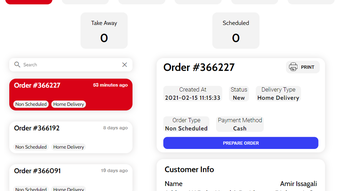
The user interface of Order Manager is structured around clarity and ease of access, prioritizing key order information at a glance. Navigation is streamlined, allowing users to quickly view active orders, check historical records, and respond to notifications. The layout appears to follow a card-based or list-based design, common in modern Android applications, which enhances readability and interaction efficiency.
Workflow efficiency is supported by the app’s focus on minimal steps to access critical data. Users can typically view an order’s status, receive alerts, and take action without navigating through multiple menus. The app’s performance is expected to align with standard Android app behavior, though exact resource usage details were not specified. The developer did not provide additional system requirements or performance benchmarks.
Stability is assumed to be consistent with typical mobile applications distributed via the Google Play Store, where updates are vetted for compatibility and security. However, specific information about CPU or RAM consumption was not included. General observations suggest that the app operates smoothly on modern Android devices, with minimal lag during navigation and state updates.
Compatibility & System Requirements
Order Manager is designed for Android devices and is available for download on the Google Play Store. The supported operating system is Android, though the exact version range was not specified. Installation size is not publicly disclosed, so users should expect a standard footprint for a functional mobile application.
Hardware requirements were not detailed by the developer. The app is likely optimized for mid-range and high-end Android smartphones and tablets, as is typical for modern business tools. Compatibility information is limited to the Android platform, with no indication of support for iOS, Windows, or macOS. The app is intended for mobile use and does not appear to have a desktop counterpart.
Pros and Cons
Pros
- Free to download and use, making it accessible to a wide range of partners.
- Real-time notifications help maintain awareness of order changes without manual checking.
- Dark mode enhances usability in low-light conditions and reduces eye strain.
- Designed specifically for Snoonu Partners, ensuring relevance and functionality.
- Simple, intuitive interface suitable for users with minimal technical experience.
Cons
- Platform is limited to Android, restricting access for iOS or desktop users.
- No information on system requirements or performance impact was provided.
- Limited to Snoonu Partners, which may reduce broader appeal.
- Exact file size and version details are not publicly available.
- Functionality is tied to a specific ecosystem, limiting standalone use.
FAQ Section
Is Order Manager available for iOS devices?
As of now, the app is only available for Android. There is no official version for iOS devices.
Can I use Order Manager without an internet connection?
The app requires an active internet connection to receive real-time order updates and notifications. Offline functionality is not supported.
Is the app secure and safe to download?
Order Manager is available on the Google Play Store, which provides security checks for apps. It is recommended to download only from official sources.
How often are updates released?
Update frequency is not specified. Users are advised to check the Google Play Store for the latest version.
What type of license does Order Manager use?
The app is free to use, with no subscription or licensing fees. It is distributed under a free-to-download model.
Final Thoughts + CTA
Order Manager delivers a focused and functional solution for Snoonu Partners seeking to manage their orders more efficiently. With real-time tracking, instant notifications, and a clean dark mode interface, the app enhances visibility and responsiveness. While its platform-specific nature and lack of detailed system information are limitations, its targeted design and free access make it a practical tool for its intended audience.
For business partners within the Snoonu ecosystem, this app offers a streamlined way to stay updated on order status without relying on manual communication. Its mobile-first approach ensures accessibility on the go, supporting modern work habits.
Download Order Manager now







